Incident Workflows
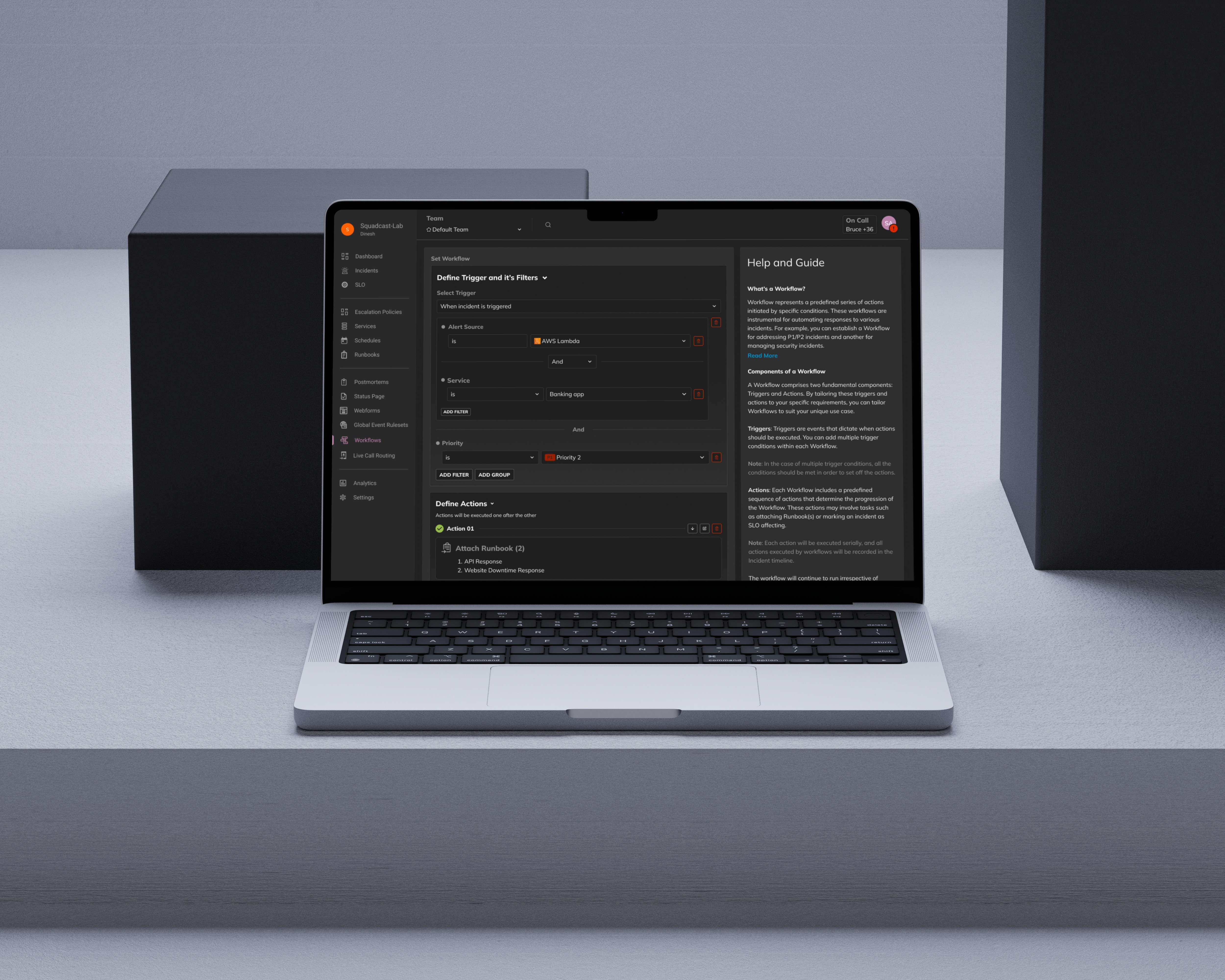
Web Application (B2B SaaS) that helps teams define incident trigger logic and automate response actions across connected tools.
Impact at a glance
~38%
Workflow adoption
of active teams created at least one incident workflow within the first 2 months
1,200+
Workflows executed
during incidents in the first release phase
~72%
Completion rate
of users who started creating a workflow successfully saved it
2.8
Avg. actions per workflow
indicating moderate automation depth
01
Problem Context
During outages, responders were bogged down by busywork: assigning responders, updating status pages, attaching runbooks. As alert volume grew, these routine steps slowed teams down at the worst possible moment. They needed condition-based automation they could trust, even mid-incident.
Users
SREs, DevOps engineers, and incident responders.
Constraints
Trigger logic with nested AND/OR conditions could get confusing fast, so the UI had to keep things clear and easy to follow.
These workflows ran during live incidents, so there was very little room for misconfiguration.
Integrations like Slack, Jira, Teams, and Zoom needed to work even when they were only partially set up.
The builder needed to hold up as teams added more filters and actions over time.
Problem Statement
Arjun, an SRE managing many services and alerts, needs a way to automate repetitive incident response tasks through configurable workflows, because manual steps during an incident slow response and raise the risk of human error.
What design needs to enable
Automate repetitive incident response tasks. Make sure the right responders, runbooks, and notifications trigger automatically. Give teams the ability to configure workflows that reliably handle incidents across multiple services.
Hypothesis i wanted to test
Hypothesis 1
If the interface provides a structured way to configure trigger conditions and automated actions, SREs will be able to automate repetitive incident response tasks more confidently.
Hypothesis 2
If the workflow logic is visually clear and easy to review, users will trust automation and feel comfortable setting up advanced configurations.
02
Research
We explored how teams handle incident automation today using existing tools, where trigger logic creates the most friction, and what keeps teams from embracing automation even when it's available to them.
Research Goal
Understand how incident response teams think about automation today, identify the pain points they face with existing tools, and learn what would need to be true for them to trust and adopt a new automation workflow builder.
Methods
User interviews with reliability engineers and incident responders.
Competitive audit of existing workflow builders in the market. Internal discussions with PM and support teams.
Participants
5 Site Reliability Engineers, 3 DevOps Engineers, and 2 Incident Commanders from enterprise customers. All of them regularly manage incidents and have experience working with automation tools in their organizations.
Key Findings
Complex logic was hard to follow
In existing tools, users struggled to understand how multiple AND/OR conditions interacted within a single workflow.
Fear of misconfiguration held teams back
Teams avoided setting up advanced workflows because they worried about triggering the wrong actions during a live incident.
Users needed to see before they trust
A consistent theme was wanting to preview exactly what a workflow would do before committing to it. Without that visibility, people didn't feel safe turning automation on.
Evidence Quotes
"I'm never fully sure what will trigger the workflow when multiple conditions are involved."
"We mostly avoid complex workflows because it's easy to break something during an incident."
"I want to see exactly what the automation will do before I save it."
Going in, I assumed the main design challenge would be organizing filters and actions in a clean UI. But through research, I realized the deeper problem was trust. Teams weren't just asking for a better layout. They needed to feel confident that the automation would do exactly what they expected. That shifted my focus toward making trigger logic transparent, predictable, and safe to modify.
03
Users
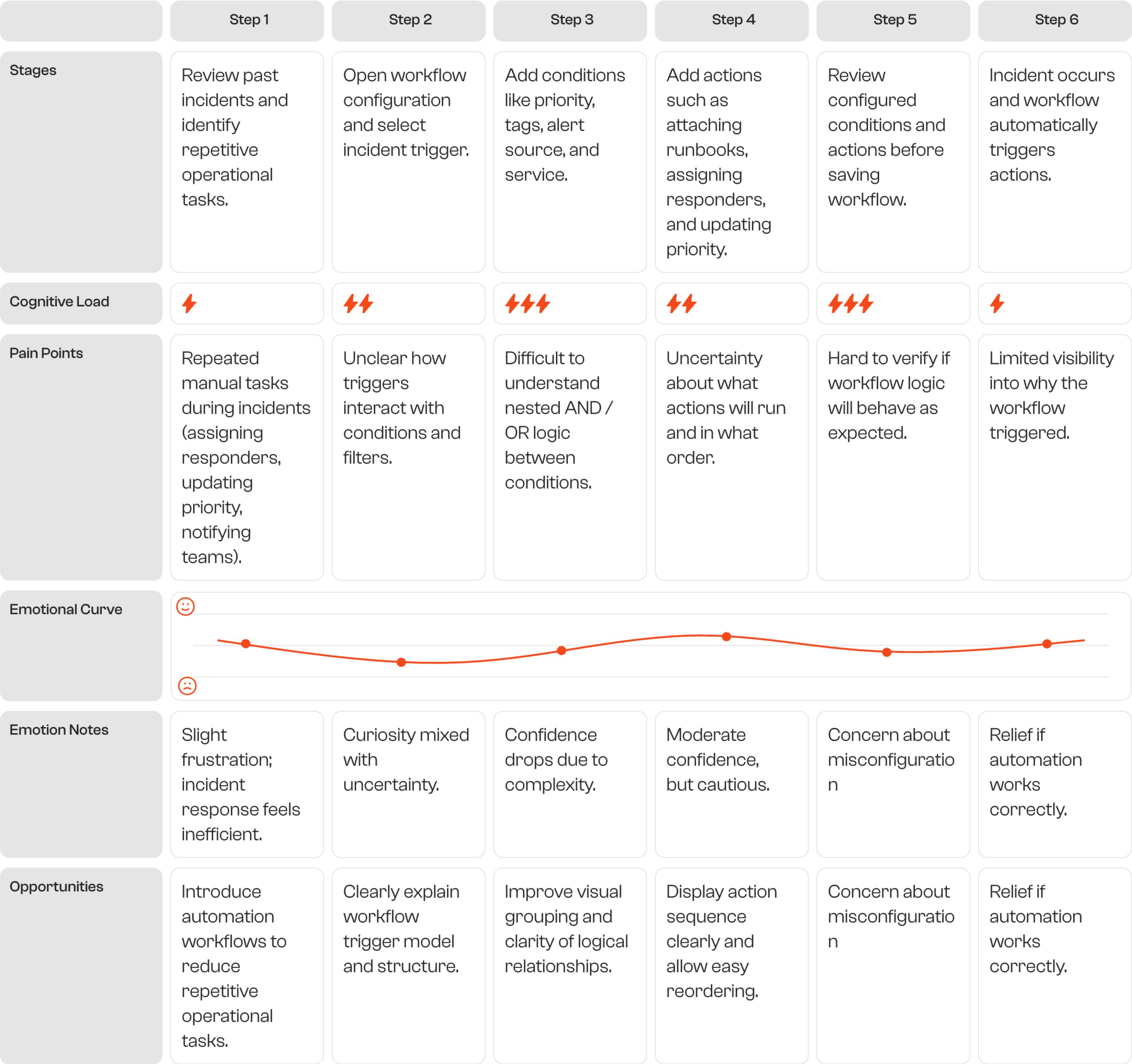
The builder was shaped around Arjun, a frontline SRE who needs to trust trigger logic in the middle of an outage. His journey shows where configuring automation breaks down today.
AN
Arjun Nair
Site Reliability Engineer (SRE)
6 years experience
Fintech company
Platform Reliability Team
What he does
Arjun manages alerts and incidents across multiple microservices. During outages, he depends on monitoring and automation tools to make sure the right responders are notified and response processes kick off immediately.
What he wants
Automate the repetitive parts of incident response. Make sure responders, runbooks, and notifications trigger automatically. Set up workflows that reliably handle incidents across services without needing constant attention.
What frustrates him
It's hard to understand automation logic when multiple conditions combine. He's afraid a misconfigured workflow will trigger the wrong actions. And editing workflows gets confusing as rules grow more complex.
Key Insight
SREs need clear visibility into trigger logic so they can trust automation during high-pressure incidents.
04
Exploration
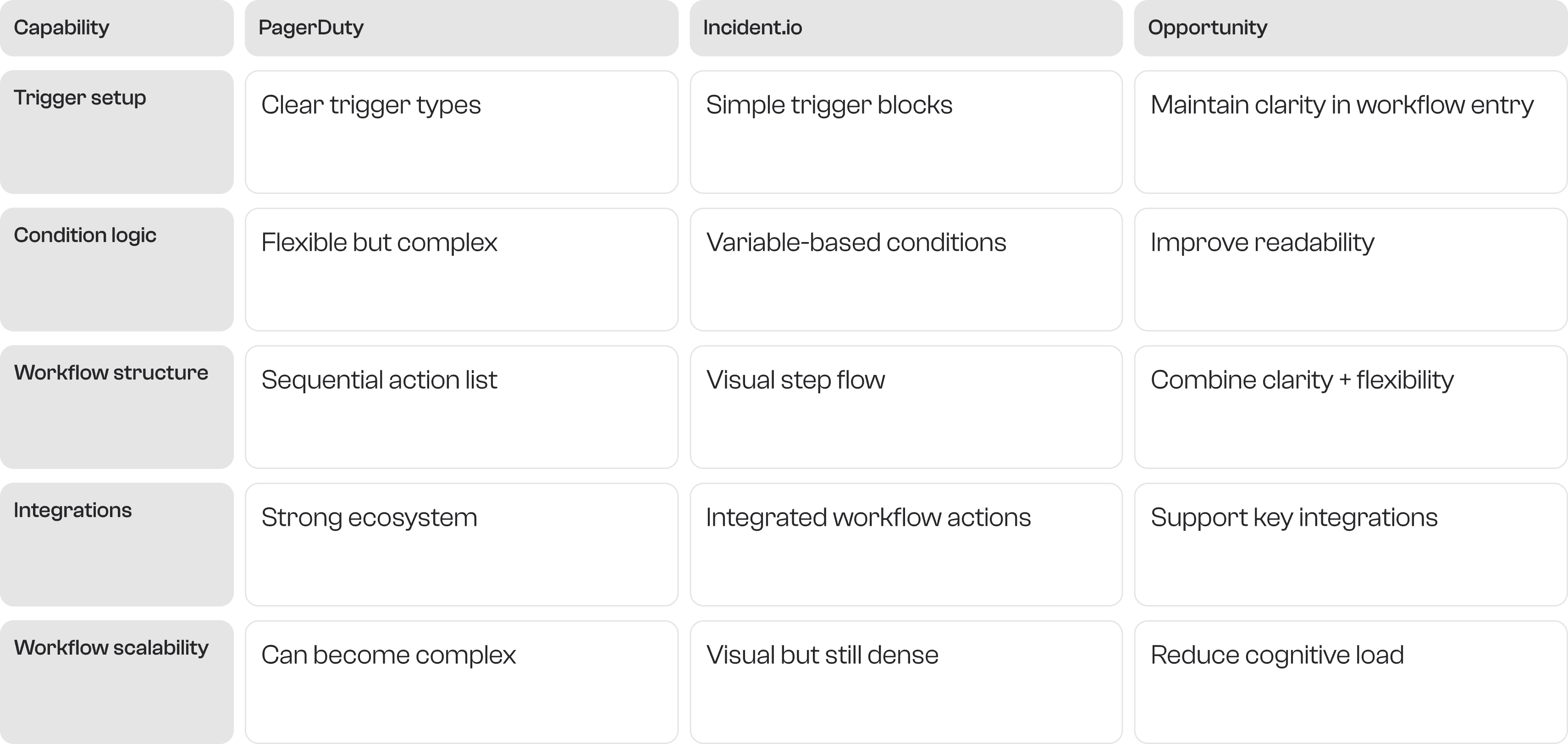
I looked at how PagerDuty and incident.io structure workflow automation, then explored three ways to represent triggers, conditions, and actions so complex logic stays readable.
Competitive audit: PagerDuty vs incident.io
Gaps and Opportunities
Opportunity 1 - Improve readability of complex conditions
Provide clearer visual grouping of nested condition logic.
Opportunity 2 - Reduce cognitive load during configuration
Create structured UI patterns that simplify multi-rule reasoning.
Opportunity 3 - Improve workflow overview
Summarize trigger conditions and resulting actions in one clear view.
Existing solutions offer powerful automation, but complex rule logic increases cognitive load. This creates a clear opportunity to design a workflow builder that balances flexibility with clarity so automation remains easy to configure and trust.
How Might I ?
Help users configure complex incident trigger logic without overwhelming them?
Make automation workflows easy to understand before they run?
Allow workflows to scale as more conditions and actions are added?
Help users confidently verify workflow behavior during configuration?
Trigger
Condition 1
Condition 2
Condition 3
PROS
Simple to build. Familiar interaction model.
CONS
Hard to understand complex logic. Doesn't scale well.
Trigger
Conditions
Actions
PROS
Clear execution flow. Easy to scan and understand.
CONS
Can become visually dense with many conditions.
Trigger
GROUP A
Priority (OR) Tags
GROUP B
Service (AND) Source
Actions
PROS
Improves AND/OR readability. Supports complex workflows.
CONS
Slightly more complex UI structure.
Why I Chose this Direction
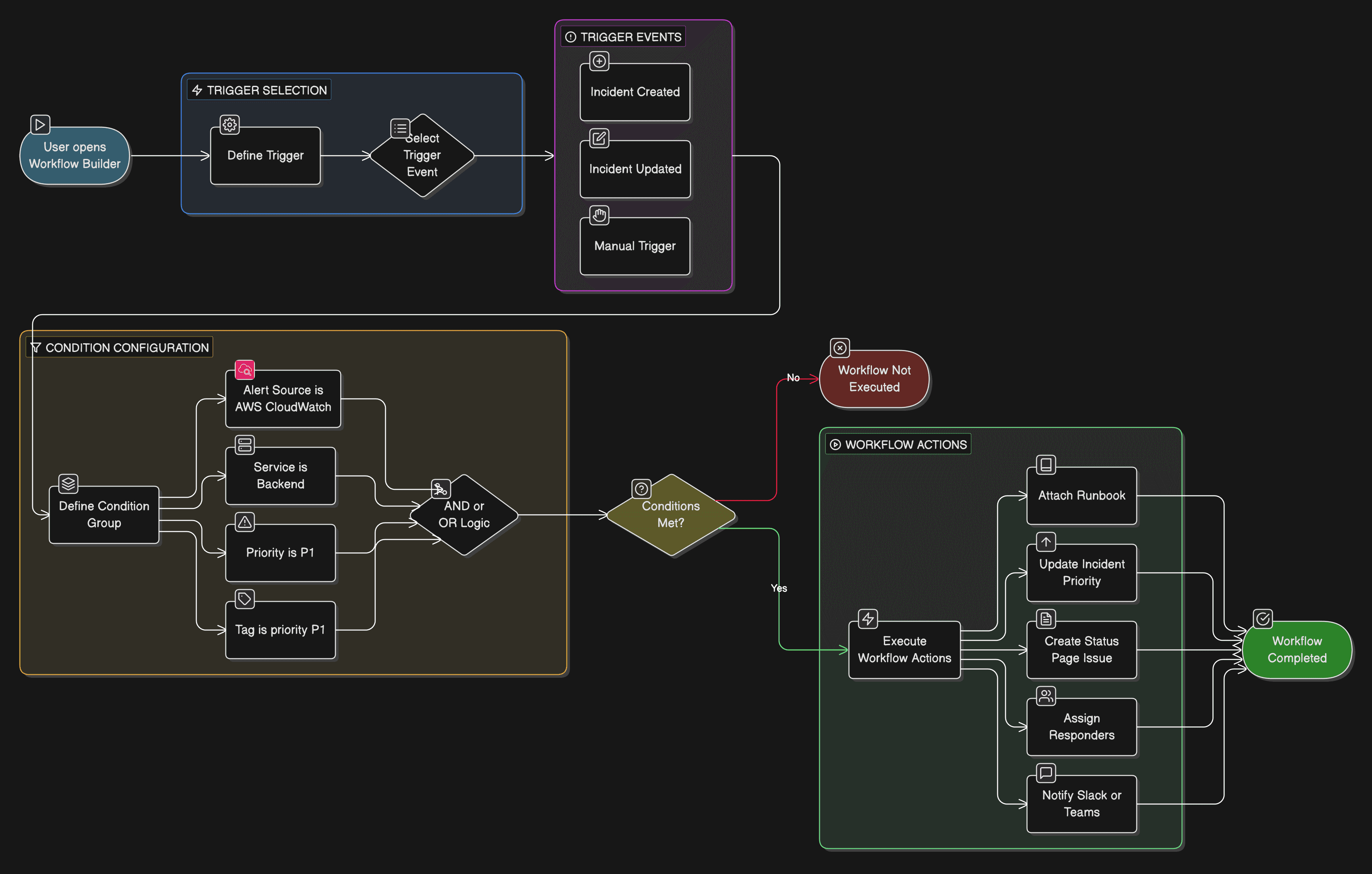
The final design adopted a structured workflow builder model where users define: Trigger, then Conditions, then Actions. This structure helps users understand when the workflow runs, what conditions must be met, and what actions will execute.
By organizing workflows into clearly defined sections, the interface reduces cognitive load and makes automation logic easier to configure and verify.
05
Solution design
I structured the workflow builder around a three-step configuration model that mirrors how incident automation systems actually operate: define when it runs, set the conditions, then choose what happens.
Information Architecture
Trigger
Defines when a workflow should run.
Conditions
Evaluate incident attributes using logical operators.
Actions
Automate operational steps once conditions are satisfied.
User Flow
Navigate to Incident Workflows
Create a new workflow
Select a trigger event (incident created, updated, or manual)
Define condition filters (alert source, service, priority, tags)
Group conditions using AND / OR logic
Add automated actions
Review workflow configuration
Save and activate the workflow
Flow Chart
High-Fidelity Design
The final interface organizes the workflow builder into two main sections, focusing on how triggers, conditions, and actions could be visually represented while maintaining clarity.
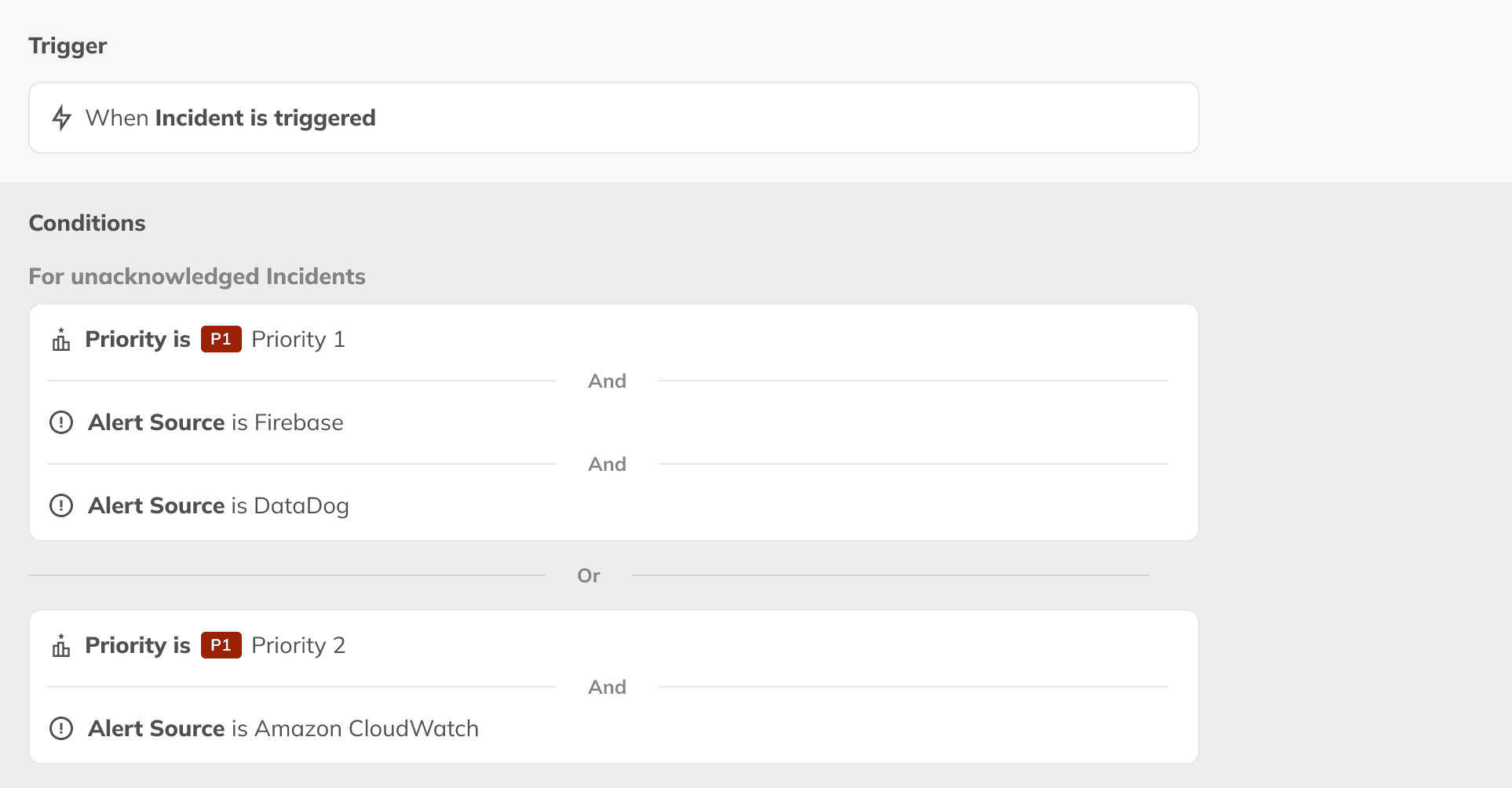
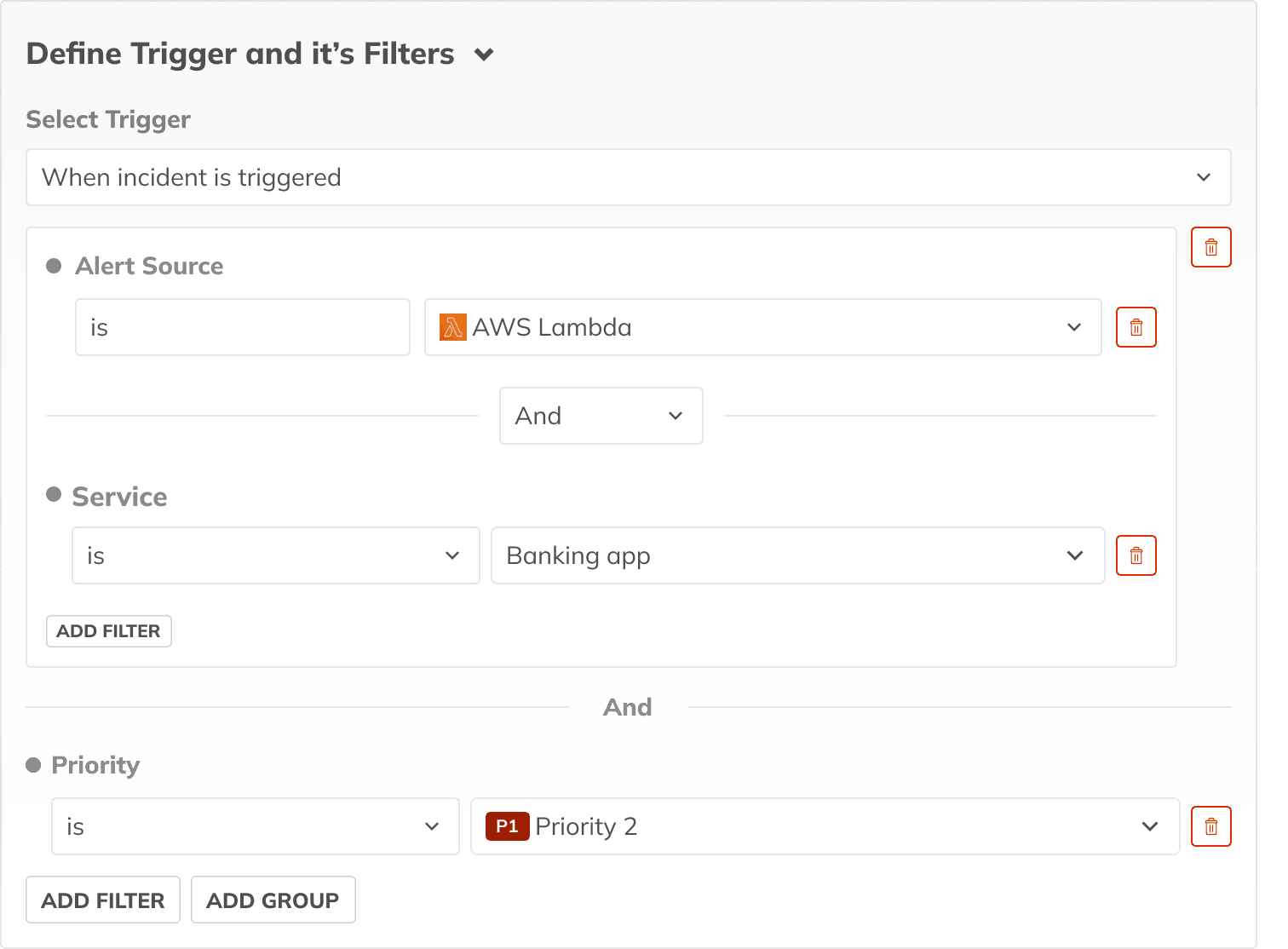
Define trigger and conditions
Users configure trigger events, alert source, service filters, priority conditions, and tag filters. Condition groups allow users to combine rules using AND / OR logic, enabling flexible automation scenarios.
Overview page
Edit/create trigger
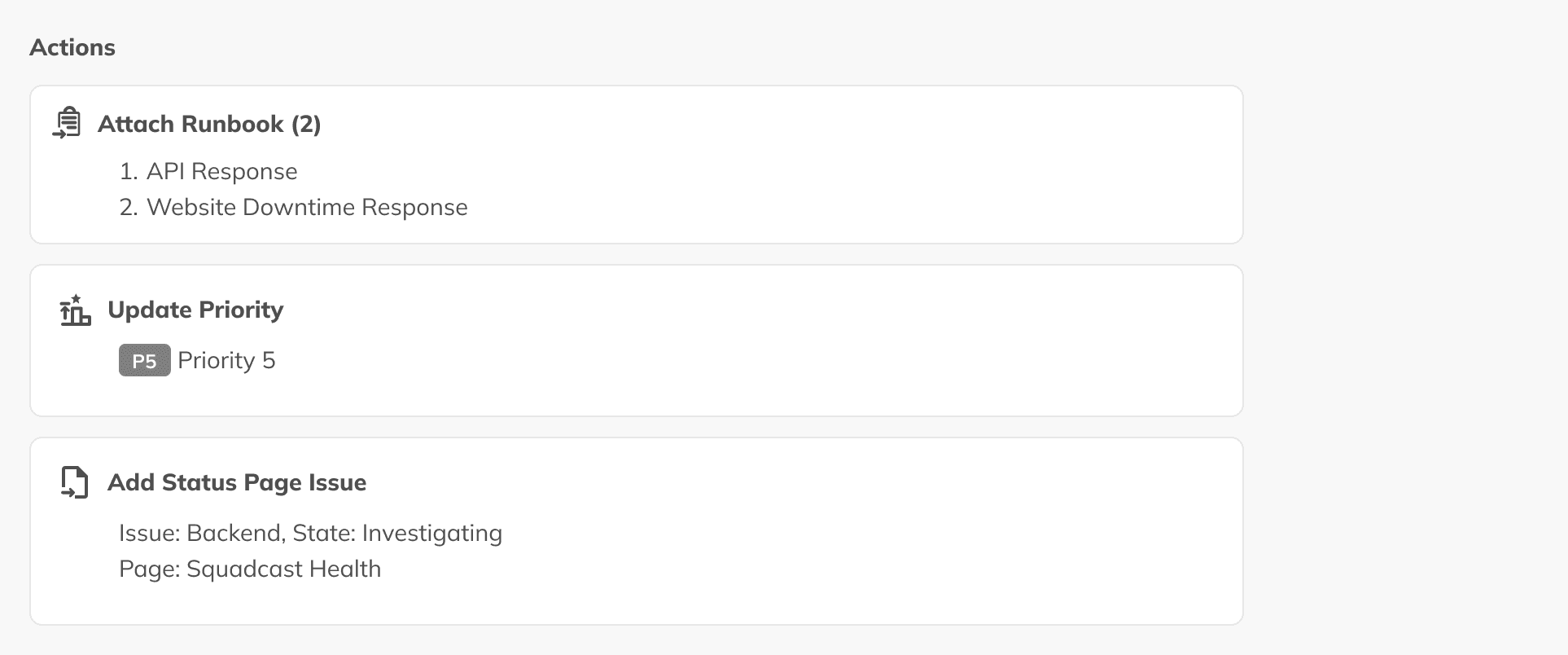
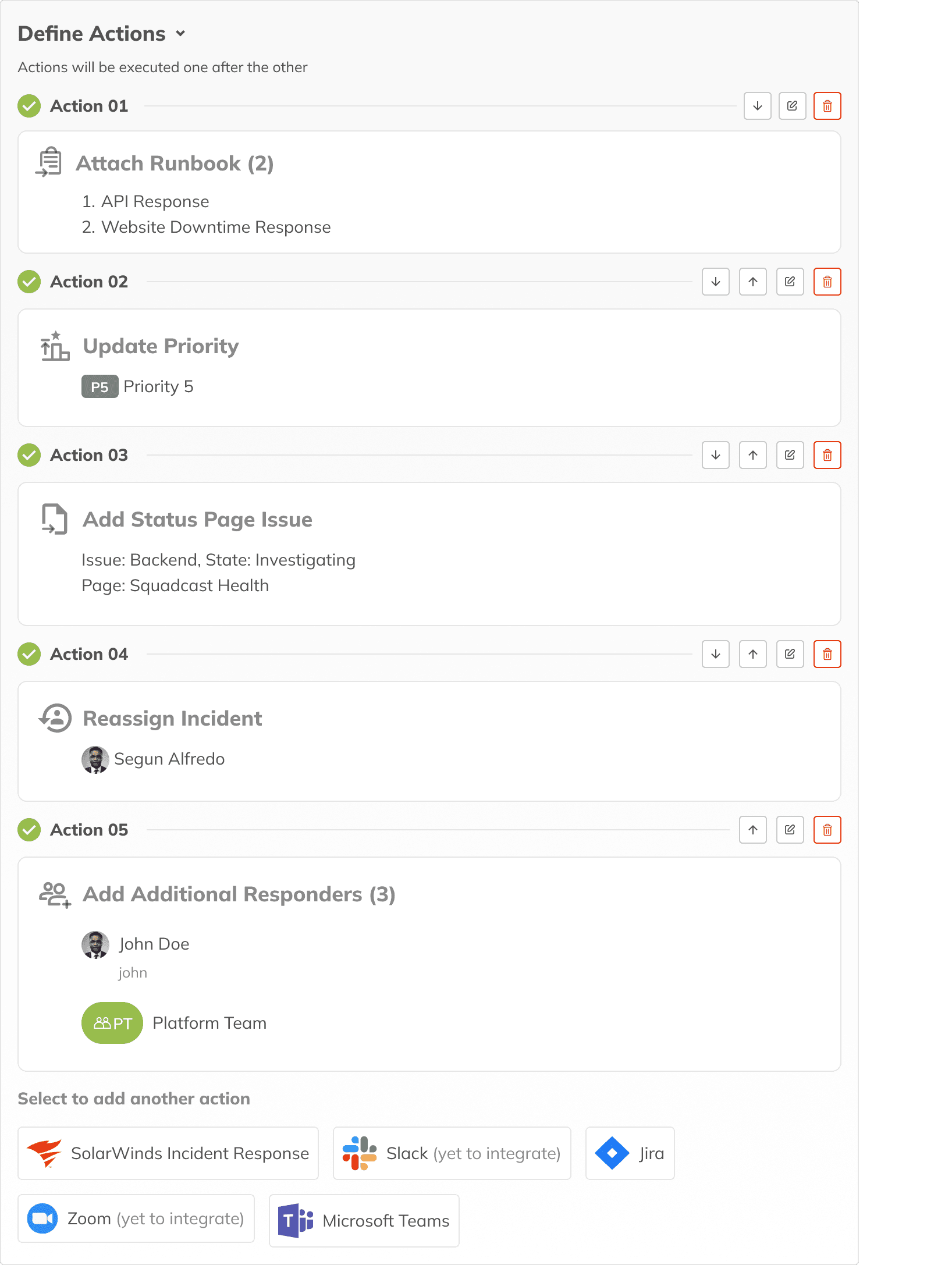
Define actions
Users can configure automated actions such as attaching runbooks, updating incident priority, creating status page issues, assigning responders, and notifying communication channels. Actions are displayed in execution order, reflecting how the workflow runs during incidents.
Overview page
Edit/create Actions
Key Interaction Decisions
1. Structured workflow sections
The interface separates configuration into Trigger, Conditions, and Actions, reducing cognitive load when defining automation rules.
2. Logical condition grouping
Condition groups let users combine filters using AND / OR operators, enabling advanced rule configuration while keeping things readable.
3. Sequential action representation
Actions are displayed as ordered blocks, clearly communicating the sequence in which automation will execute during an incident.
4. Action selection panel
A dedicated panel lets users browse available integrations and automation tasks without cluttering the main workflow interface.
5. Accessible by default
AND / OR relationships are labeled in text, not only shown through grouping, and the builder uses standard dropdowns and toggles that work with assistive technology.
Remaining Gaps
Complex workflows may still introduce high cognitive load when multiple conditions are combined.
Limited visibility into how automation logic will execute, which could affect comprehension for some users.
Some interactions depend on visual grouping, which may need additional textual descriptions for screen readers.
What I’d do next
Add plain-language summaries that show what a workflow will do before it runs.
Improve keyboard navigation across condition groups and actions.
Make AND / OR relationships clearer with stronger visual and text feedback.
Projects
Explore more like this one


Selected projects that reflect my approach to design, development, and execution.